
MultiWalk Pre-release Enhancements and Improvements
This article describes what is new in the MultiWalk pre-release: the enhancements and fixes that will be in the next official MultiWalk release. It is written for those of you testing the pre-release, and it is updated when a new pre-release snapshot goes out.
STOP – Please do this BEFORE you run the installer, or the install will likely fail
Your anti-virus software will very likely quarantine this release unless you act first.
This release contains new programs that no previous version of MultiWalk had: a 64-bit processing engine and a standalone 64-bit Report Viewer. Anti-virus products see brand-new executables they have never encountered and quarantine them on sight. This is a false positive. The files are digitally signed, safe to run and clean. But the anti-virus does not know that yet. If this happens, the install is dead in the water until the steps below are done.
Before you run the installer:
- Add these two folders to your anti-virus software’s exclusion (exception) list:
- C:\MultiWalk\Program
- C:\Program Files (x86)\TradeStation 10.0\Program
- Reboot the computer. Adding the exclusions is not always enough on its own. Some anti-virus software does not let go of files it has already quarantined until the machine restarts. Reboot after adding the exclusions, then run the installer.
If MultiWalk or TradeStation is installed somewhere other than the default, use your own folders. The installer’s first screen shows the exact folders for your machine.
Installing the pre-release
The pre-release installer is on the MultiWalk pre-release and benchmark kit download page. The installation steps are in Installing MultiWalk.
IMPORTANT: After installing, you MUST import the two new MultiWalk ELD files into TradeStation:
- MULTIWALK APP.ELD
- MULTIWALK USER FUNCTIONS.ELD
The installer opens the MultiWalk Program folder with these files. Just double-click each one to import it. When TradeStation asks whether to replace the existing code, choose to overwrite it.
If anything looks wrong, or you have a question, please let me know at [email protected]. If there was a problem, send me the project’s LogMessages.txt file and the steps that led up to the problem.
Enhancements
New Report Viewer
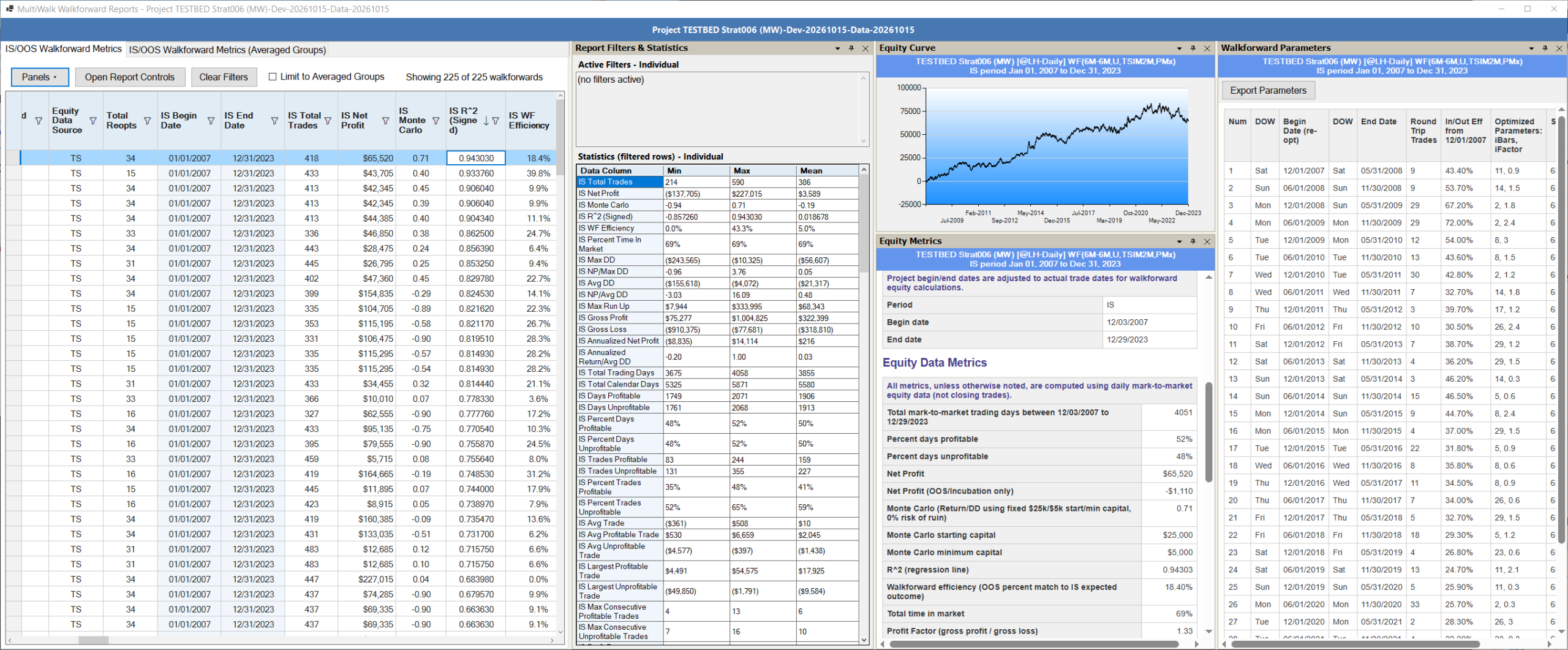
Walkforward reports have moved out of TradeStation’s report grids and into a dedicated 64-bit Report Viewer application that opens automatically from MultiWalk. This removes MultiWalk’s dependence on TradeStation’s grid control and it will not be affected by future TradeStation updates.
Beyond fixing the grid issue, the viewer adds substantial functionality:
- FAST. Unbelievable fast. I loaded a 84,000+ row walkforward report in less than 5 seconds!
- Dockable and resizable panels. Move the to new locations, adjust them for your monitor.
- Column sorting.
- Advanced and complex filtering. All columns can be filtered, including symbols and other columns that could not be done in previous MultiWalk versions.
- Different data views: equity curve chart, performance chart details, walkforward parameters, trades list, EasyLanguage code preview and more.
- One-click export for external scripts or Excel.
- Format changes are “remembered” between sessions, or saved as default template for all projects.
Older projects open in the viewer directly – no conversion needed.
The TradeStation grid problem is over (if you update to TS Update 94 or higher)
TradeStation broke their spreadsheet grid control in Update 89 back in October 2025. As of Update 94 they have finally corrected the issue. However, to avoid this from ever happening again, I will no longer use their grid objects for walkforward reports and have replaced them with my own 64-bit report viewer.
The X64 Performance Pack: a 64-bit engine and faster runs
This release introduces the X64 Performance Pack, an optional module added to your MultiWalk license. With the pack:
- The walkforward runs in MultiWalk’s own 64-bit program instead of inside TradeStation. Every program inside TradeStation shares a limit of about 2 GB of memory; the 64-bit walkforward can use all of your computer’s memory, so large projects that previously struggled or failed have the room to complete, and TradeStation stays responsive while the walkforward runs.
- Optimization results are packaged and saved by MultiWalk’s own 64-bit program, so TradeStation’s optimizer threads no longer wait on each other.
- The walkforward uses every thread your processor has, and more threads now make it faster.
- The Auto setting chooses the fastest thread counts for your strategy and your processor.
On the computers measured so far in the MultiWalk User CPU Benchmark Tests, whole projects finished 1.4 to 6.4 times faster with the pack. Results are identical with and without it – same math, same reports, same database.
For the pre-release, every MultiWalk license includes an X64 Performance Pack trial through November 26, 2026, so you can try it on your own projects. MultiWalk uses the pack automatically while the trial lasts.
After the trial, or on a license without the pack, MultiWalk runs on its Standard engine as it does today, and every other change in this article applies to you just the same. The top of the progress screen shows which engine a run is using: X64 performance engine or Standard performance engine. On the Standard engine, more threads is not automatically faster; see Will adding more threads make MultiWalk run faster?
Futures margins and symbol sectors are back
TradeStation’s website no longer lets programs such as MultiWalk read its futures margin page, so MultiWalk’s daily update had been finding nothing: reports showed “Unknown” for Symbol Sector and $0 for the margins. Monte Carlo analysis, which starts from a symbol’s overnight margin, used its other starting-equity method instead. MultiWalk now gets the same margin, sector and description information from multiwalk.net, and ships with a copy of it, so the information is there from the first start. Projects with existing walkforward results show the sector the next time they run. Their Monte Carlo figures stay as they were; to bring them up to date, run the project’s walkforwards again.
Forex symbols now report in your account’s currency
If you test forex symbols, this one matters. Previously, MultiWalk’s results for forex pairs were calculated in the symbol’s quote currency – GBPJPY results were in yen, EURGBP results in pounds – which made net profit look inflated by 100x or more compared to TradeStation’s own account-currency reports. Optimization and walkforward P&L is now calculated in your account’s currency (U.S. dollars for U.S. accounts), matching what TradeStation shows on a chart with “Currency Based on” set to Account. A new Settings->General option, “Use account base currency,” is ON by default; unchecking it restores the previous symbol-currency behavior.
Symbols quoted in dollars – futures, stocks, and USD-quote pairs like EURUSD – are completely unaffected; we verified their results are identical down to the last byte under both settings.
Three notes for forex users:
- Forex results from this release are not comparable with forex results from earlier releases (those were in the quote currency).
- Slippage and commission values are applied per unit in the active currency. If you tuned forex cost values under the old behavior (for example, 0.02 to represent 2 pips on a JPY pair), re-express them in dollars – the same number now means $0.02 per unit, which overstates the cost by roughly 150x. This applies to per-symbol slippage/commission files as well.
- Where optimization iterations scored nearly identically, walkforward selections may differ from previous runs, because currency conversion re-weights trades over time rather than scaling everything by one constant.
Going back to a previous release
This release updates each project’s database to a new format the first time it opens the project. That is automatic and needs nothing from you. If you ever need to return to the February or April 2026 release, though, those versions cannot read the new format on their own. So this release includes a small program for exactly that: the MultiWalk Database Downgrade Utility (in your Start Menu under MultiWalk). Point it at a project’s WalkforwardData.db, or at a folder to find every project under it, and it puts the databases back into the earlier format in place. Nothing is lost: when you install the new release again later, it simply updates the databases forward again.
Returning to a Previous MultiWalk Release walks through the steps and the things to do before you run it.
Bug fixes
Some results that may differ from earlier releases
Most projects produce the same results as before. But there are some very specific cases that may or may not effect your results compared to previous MultiWalk versions. Each one is described in full further down.
- Walkforwards whose in-periods are defined by trade count (for example “25T”): some period boundaries land on different dates.
- Forex symbols: results are now in your account’s currency.
- Least Max DD and Least Avg DD fitness functions: some periods may select different parameters.
- Time in Market and RINA: RINA as a fitness function may select different parameters.
- Average Trade and other trade-based metrics, may have changes, but only when “Calculate using TradeStation” is off.
- IS Walk-Forward Efficiency: some values differ slightly.
Walkforward results and metrics
- Trade-count walkforward periods are measured differently: If your walkforward in-periods are defined by TRADE COUNT (for example “25T”), this release changes how those periods are measured: only complete round-trip trades – both the entry and the exit inside the period range – now count toward the trade count (previously a position already open when the range began could contribute), along with corrections to the period boundary arithmetic. Walkforward period boundaries will land on different dates than in earlier releases. Trading-day and calendar-based periods are not affected.
- Least Max DD and Least Avg DD fitness functions: in a walkforward period where the first parameter combination (all inputs at their start values) did not trade, that combination could still be selected. This had no impact on most projects and some showed more than others. But projects that are effected may select different parameters the next time you run its walkforwards. All other fitness functions are not affected.
- Trade list and equity curve agree: when using MultiWalk’s built-in fast walkforward engine to estimate trades and equity curves (i.e., “Calculate using TradeStation” is off), the walkforward’s trade list now agrees with its equity curve. Previously, a trade open across a reoptimization could include profit or loss from before the new period. Trade-based metrics may change when you next run the walkforward, mainly Average Trade, which commonly moves by 5% to 20% and occasionally more. Monte Carlo using trades as the basis may also be affected. Monte Carlo using M2M as the basis is unaffected. Walkforward parameters and all M2M-based metrics (the majority of the metrics, such as Net Profit, Sharpe, NP/Avg DD, etc.) are not affected.
- Time in Market now matches TradeStation’s Strategy Performance Report. A walkforward’s summary results left out the weekends and holidays a position was held over, so a strategy that holds over weekends could show about 52% where TradeStation shows 66%. Total Minutes and Percent Time In Market, RINA and the profitable / unprofitable day counts may change when you next run the walkforward. If you use RINA as a fitness function, some walkforwards may select different parameters, because RINA is calculated from time in the market: in my test projects roughly one RINA walkforward in seven did. All other fitness functions and metrics are not affected.
- IS Walk-Forward Efficiency: fixed the metric occasionally showing zero when the final walkforward period ended exactly at the in-sample range end, and tightened its boundary rule so the metric never uses a period that has not yet completed. Some IS WF Efficiency values will differ slightly from prior releases; no other metrics are affected.
- Fixed a crash that could occur when running walkforward analysis with multiple threads. Two worker threads reporting an error at the same moment could collide on shared error state; each thread now maintains its own.
Optimization data
- Optimization data that ends early is now caught. On rare occasions TradeStation runs an optimization on bar data that stops well before the end date you asked for. MultiWalk now treats data that ends more than 6 days early as missing data. It downloads that symbol’s data again and re-runs the optimization, up to two times. If the data is still short, it keeps the optimization and tells you in the run’s messages. Before, these optimizations went unnoticed until their walkforwards were skipped for not having enough data.
- Fixed an optimization that MultiWalk reported as “WILL BE SKIPPED” being run again anyway, which could then stop the whole project. It is now skipped, and the project continues.
- Fixed a whole project being cancelled part-way through with a “Permission denied” error while writing the optimization submissions file. When MultiWalk’s data checks find a gap in a symbol’s history, it queues that optimization to be run again – and recording that could fail with “Could not create/write optimization submissions file”, which stopped the entire project rather than just that one optimization. Despite the wording, this was never a file, folder, or permissions problem on your machine, and nothing was wrong with your project or your MultiWalk installation – an internal file path was being corrupted before use. The problem was intermittent, which is why the same project could get further on one run than on another. If you hit this, your project can simply be resumed – completed optimizations are preserved.
- Fixed intermittent “Data Error -6. Data is corrupt.” errors stopping a run while reading optimization or walkforward data. In almost every reported case the stored data was fine: the error was a momentary memory glitch during decompression – most often on machines running aggressive RAM overclock profiles (XMP/EXPO). MultiWalk now automatically retries the read, so these runs complete instead of aborting; a genuinely corrupt file is still reported. If your log shows that a read succeeded only after a retry, that is a strong sign your RAM is running beyond what it can reliably handle – consider using standard (non-overclocked) memory settings.
- Fixed a project being reported as stopped when its only problem was a skipped optimization file (dates that did not match the project, or a file that could not be read). These are now reported as warnings, and the project completes normally.
- When walkforwards are skipped (for example, when there is not enough data for an in/out period), the end of the run now says how many: “Project completed. 29 walkforwards were skipped.” Before, it said “Project successfully completed.”
Report Viewer and walkforward databases
- Fixed re-running a project while its Report Viewer window was open failing with a “database is locked” error. The viewer no longer holds the database between detail views, and if anything else is holding it MultiWalk now shows a clear message instead of an SQL error.
- Walkforward databases from earlier releases are now upgraded automatically the first time they are opened – no action needed.
- When a walkforward cannot save its results because another program has the project’s database open, the message now says so – for example the Report Viewer, another MultiWalk window, or a backup or sync tool – instead of only “database is locked”.
- Fixed a rare case where a project’s walkforward database stayed in use until TradeStation was restarted. If a strategy tracking report came across a damaged walkforward record, later walkforwards on that project could not save their results, and starting a new run reported that the database was in use by another program. Restarting TradeStation always cleared it; now it no longer happens.
- When MultiWalk recalculates a walkforward strategy in TradeStation to get TradeStation’s own results, the new equity curve and its metrics are now saved together in one step, so an interruption can no longer leave them out of step with each other.
Symbol information and futures margins
- MultiWalk keeps a small database of symbol information on your machine – futures margins, contract dates, and other symbol details. Previously, if an older version of MultiWalk (for example, a dated support build we provided for a past issue) was run on the same machine as a newer one, the older version could mistake the newer database for a damaged one and quietly erase and rebuild it – losing the collected margin and symbol information each time. Starting with this release, an older MultiWalk simply tells you the database belongs to a newer version and leaves it alone.
- Fixed a pause of up to 30 seconds that could occur when a MultiWalk window loaded its symbol information while the daily futures margin update was being saved. The margin update is no longer lost in that situation either.
- Fixed futures margin and symbol detail updates sometimes being skipped in every MultiWalk window until TradeStation was restarted, after an update that could not reach the symbol database. Two windows also no longer run the same update at the same time.
Messages
- The message window at the end of a run now begins with a summary of how the run ended: completed, stopped at your request, or stopped with the reason. When there are more than 100 messages, it now says it is showing the last 100 and that all of them are in the project log (LogMessages.txt).
- If TradeStation lost its connection to its data server and a project was started again before the connection returned – for example by clicking Resume several times – each attempt opened another copy of the same “TradeStation Offline” message, and many identical message windows could build up on the screen. MultiWalk now shows a message only once while it is still open; after you click OK, it can appear again if the situation comes back. No more than five MultiWalk message windows are open at a time, apart from messages MultiWalk always shows, such as program errors.
- Fixed a run that could stop without any message when MultiWalk could not confirm the license, after which Resume did nothing until the MultiWalk window was reopened. MultiWalk now reads your TradeStation customer number once, when the window opens, and if a license check ever stops a run it tells you why.
- The project log and the project’s setup file showed commission and slippage rounded to two decimal places, so a $0.005 per-share commission appeared as 0.01. Only the displayed values were affected: optimizations and walkforward results have always used the exact amounts you entered, which is also what the generated walkforward strategy code shows. These values now appear with up to five decimal places.
Shorter file names
- The optimization iterations CSV files (“OptIterations [<symbol and interval>] [<begin> to <end>].csv”) now have shorter names: the strategy name has been removed from the file name. This applies only to these CSV files; the optimization files themselves (the “_MultiWalk.dat” files) keep their names, strategy name included. The strategy name was never needed in the CSV name, because the file already sits in the project folder of the same name. It made the full path longer than it had to be and could run into the Windows path length limit.
- The Limited Feasibility results file has a shorter name too: “Preliminary Optimization Results.csv”, without the strategy name, in every mode. Existing projects need no attention – the first time MultiWalk needs the file it renames the old one to the new name in place.
Limited Feasibility report
- Fixed the Limited Feasibility report showing the same number in every numeric column (for example 159 everywhere, with the percent columns reading 15,900%) on TradeStation Updates 91, 92 and 93. This was a display issue in the workaround MultiWalk uses for the TradeStation grid problem on those updates; the results in your report file were correct all along, and users on Update 94 or later were not affected.
- Clicking the Selected column in the Limited Feasibility report now updates just that one row in the report file. Previously the click saved the file from what the report was showing on screen, so the saved file took on the display’s view of the data – the Project Task Name column was left out, rows hidden by “display passing only” or beyond the display limit were not kept, numbers were saved in their display format, and on Updates 91-93 the display values described above were saved in place of the real ones. The save now reads the file, changes the Selected mark on the clicked row, and leaves everything else exactly as it was.
MultiWalk Trader
- Fixed MultiWalk Trader’s Data Prefetch using only the first project in the project list to decide how far back to fetch. It now covers the earliest begin date and the latest end date across all listed projects, so projects that start earlier than the first one get all the data they need. The prefetch is now based only on the projects in the list and no longer uses the MultiWalk Trader symbol or date overrides, which belong to the Batch and Strategy Tracking runs themselves.