
MultiWalk Pre-release and Benchmark Kit Download
TWO IMPORTANT NOTES:
1. I have activated the X64 Performance Pack for everyone’s license for a trial period that ends on Nov 26, 2025. The pack will go on sale for a Black Friday discount from Nov 23 – Dec 1.
2. When installing MultiWalk or running the benchmark kit, I have found that my and other users antivirus software interfere, quarantining the new MultiWalk 64-bit executables, or by slowing down the benchmark progam as it runs due to frequent antivirus scans (which invalidate the benchmark results), or by outright killing the benchmark program (which definitely invalidates the results!). There is nothing dangerous or malicious with the kit or MulitWalk. The antivirus scanners are being hyper vigilant and giving false-positive results with the kit or the new 64-bit processes in MultiWalk. All MultiWalk and benchmark programs are digitally signed, clean and safe to use.
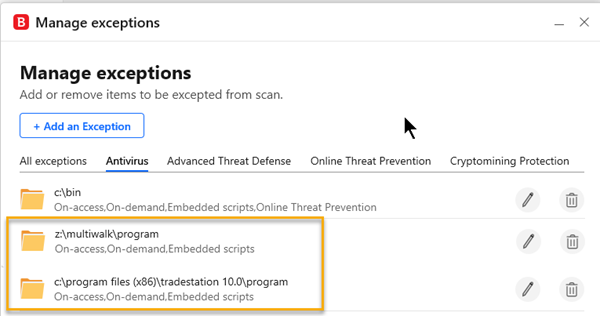
I strongly suggest adding these two folders to your antivirus exception list:
C:\MultiWalk\Program
C:\Program Files (x86)\TradeStation 10.0\Program
Those are the default locations, so if you have installed MultiWalk and TradeStation to different folders, use your own locations.
Windows Defender Instructions:
- Open Windows Security (search for it in the Start menu).
- Go to Virus & threat protection.
- Under Virus & threat protection settings, click Manage settings.
- Scroll to Exclusions and click Add or remove exclusions. Approve the admin (UAC) prompt.
- Click + Add an exclusion → Folder, then pick the folder.
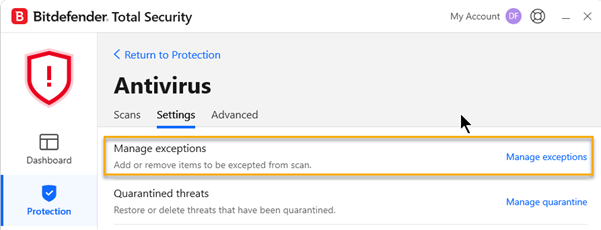
Bitdefender Instructions:
Here’s what it looks like on my system using Bitdefender:
Current MultiWalk Pre-release Download
The current MultiWalk pre-release MUST be downloaded and installed for the benchmark kit, or else the benchmark will not run. The benchmark kit is designed specifically for the new release of MultiWalk.