
X64 Performance Pack
The X64 Performance Pack is an optional module for MultiWalk that makes your projects finish faster. It moves the bulk of MultiWalk’s heaviest work out of TradeStation’s 32-bit program and into MultiWalk’s own 64-bit programs, lets the walkforward use every thread your processor has, and picks the fastest thread counts for you. Your results stay exactly the same; you simply get them faster. Plus, as a bonus, TradeStation is more stable since MultiWalk puts less stress on it.
On the computers measured so far in the MultiWalk User CPU Benchmark Tests, the pack ran whole MultiWalk projects, optimization and walkforward together, 1.4 to 6.4 times faster than MultiWalk’s Standard engine on the same computer.
The pack at a glance
- Whole projects 1.4x to 6.4x faster, measured on real MultiWalk projects on users’ computers.
- Walkforwards that use every core. The more threads your processor has, the faster your walkforwards run.
- Faster optimizations. MultiWalk’s part of each optimization no longer slows TradeStation’s optimizer down.
- Room for your largest projects. The 64-bit walkforward can use all of your computer’s memory instead of about 2 GB.
- A more responsive and stable TradeStation. The heavy lifting happens in MultiWalk’s own 64-bit programs.
- Automatic thread counts. The Auto setting chooses the fastest thread counts for your strategy and your processor. No more guessing.
- Full speed on newer Intel processors and laptops. The X64 Performance Pack keeps MultiWalk’s work on the fast performance cores.
- Identical results. Same projects, same reports, same numbers.
How much faster on real computers
The User CPU Benchmark runs three typical MultiWalk projects, light, moderate and heavy, once with the X64 Performance Pack (Auto threads) and once on the Standard engine (8 threads), on each tester’s computer. This is how many times faster each project finished with the pack. Higher is better.
| Computer | Light | Moderate | Heavy |
|---|---|---|---|
| AMD Ryzen 9 9950X | 3.7x | 1.5x | 3.0x |
| Intel Core i9-13900K | 3.5x | 1.4x | 3.2x |
| AMD Ryzen 9 7950X | 3.4x | 1.4x | 3.2x |
| Intel Core i5-12600K | 3.4x | 1.4x | 3.0x |
| Intel Core i7-11800H | 3.4x | 1.5x | 2.4x |
| Intel Core i5-13600T | 3.5x | 1.4x | 3.1x |
| Intel Core i5-1235U | 3.5x | 2.1x | 6.4x |
The pack gave every computer a substantial gain, from high-end desktops to low-power laptops. The slowest computer in the test, with the pack, finished the light and heavy projects sooner than the fastest computer without it. The full results, and how to add your own computer, are on the benchmark page.
What the pack does for you
A 64-bit walkforward engine
With the pack, the walkforward runs in MultiWalk’s own 64-bit program instead of inside TradeStation. Every program inside TradeStation shares a limit of about 2 GB of memory; the 64-bit walkforward has all of your computer’s memory available, so large projects have the room they need and TradeStation stays responsive while the walkforward runs.
Walkforwards that scale with your processor
The Standard engine’s walkforward gets little benefit beyond about 8 threads. The pack’s walkforward was rebuilt so that its threads no longer queue up behind each other, and it uses every logical processor by default. More cores now mean faster walkforwards.
- On a 2,304-walkforward test project, the walkforward phase went from 393 seconds on the Standard engine to 91 seconds with the pack using every thread.
- Faster walkforward calculations cut the walkforward phase by 2.6x to 3.3x on four test projects.
- Loading the optimization files is faster too: one project’s walkforward went from 69 seconds to 16.
Faster optimizations
TradeStation’s optimizer does the optimization, and MultiWalk saves the results of every iteration. With the pack, those results are packaged and saved by MultiWalk’s own 64-bit program, and TradeStation’s optimizer threads pass them along without waiting on each other.
- Optimization phases are up to 1.75x faster on strategies where saving the results was the bottleneck.
- The pause to process results at the end of each optimization task drops from 5-7 seconds to about one second. On a project with hundreds of tasks, that adds up.
Automatic thread counts (“Auto”)
The best number of threads depends on your strategy, its bar interval, how much data it has, how many MultiWalk windows are running and your processor. With the pack, the Auto setting determines this for each task.
Optimizations
The first time a strategy runs with Auto, a short probe optimization measures how much work it does (it calculates the computational “weight” and complexity of your strategy). The result is saved with the project and reused until the strategy or its settings change. Without the pack, you would have to guess at the number of threads to use and enter that number manually. And even then that entered thread count is a “one size fits all” blanket that was applied to every symbol/bar interval optimization. The pack’s Auto setting adjusts to the best thread count for every individual optimization within the project, increasing throughput dramatically.
Walkforwards
The pack also gives the walkforward its own thread setting, separate from the optimization, and Auto lets it use every thread your processor has.
Full speed on newer Intel processors and laptops
Many recent Intel processors have two kinds of cores: fast performance cores and slower efficiency cores. Windows sometimes moves long-running background work onto the efficiency cores, which can make a MultiWalk run 2 to 4 times slower, especially overnight or when TradeStation is not the front window. The pack tells Windows to treat MultiWalk’s work as foreground work, so it stays on the performance cores.
- Windows 10, Intel Core i9-13900K: optimizations 1.7x faster.
- Windows 11, Intel Core i5-12600K: a window’s first run went from 59 seconds to 22 seconds.
- Laptop, Intel Core i7-11800H: optimizations 17-19% faster.
Who benefits
Everyone. Every computer and every test project in the User CPU Benchmark finished faster with the pack. The smallest gain on a whole project was 1.4x, and the light project, the simplest of the three, gained the most: 3.4x to 3.7x faster on every computer.
The gains grow even larger with:
- Large walkforwards – many in/out periods, several fitness functions, or many optimization files. The walkforward phase is where the pack gains the most, and the gain grows with your processor’s thread count.
- Larger bar optimizations (60-minute bars and above), where the optimization spends much of its time saving results.
- Newer Intel desktops and laptops with performance and efficiency cores.
- Several MultiWalk windows at once, because the windows no longer queue on each other’s work.
Optimizations on bars under 60 minutes gain less in the optimization itself, because most of their time is TradeStation running your strategy’s code bar by bar. They still benefit from everything else the pack does: the 64-bit walkforward, the shorter pause after each task, Auto thread counts and full-speed cores.
What stays the same
- Your results. Every speed measurement on this page was accepted only after the results from the two engines were compared and found to match. The pack changes how long a run takes, never what it produces.
- Your projects. Settings, strategies, reports and result files are the same either way, and a project run with the pack can be opened and continued without it.
- The way you work. There is nothing new to learn. Once the pack is on your license, MultiWalk uses it automatically.
Checking that the pack is active
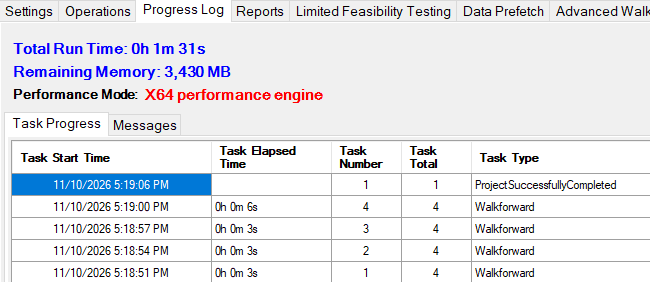
When a run starts, the top of the MultiWalk progress screen reads X64 performance engine.
Without the pack it reads Standard performance engine:
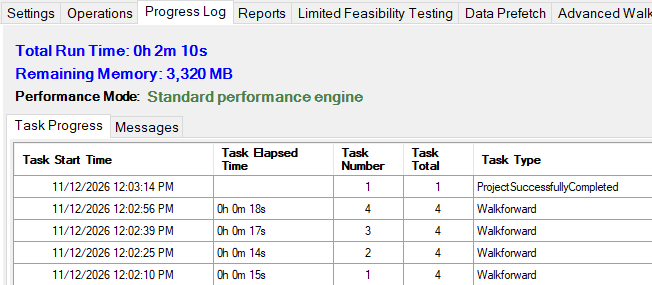
If you have the pack and the progress screen still shows the Standard engine, the most common reason is a license file from before the pack was added. Installing your current license file fixes it. If that does not help, please let me know at [email protected].
Getting the X64 Performance Pack
The X64 Performance Pack is added to your existing MultiWalk license. Please visit MultiWalk’s purchase page for purchase options, or email me at [email protected] for more information.
For help choosing a computer for MultiWalk, see What is the best computer system to run MultiWalk? and the MultiWalk User CPU Benchmark Tests.