
New Update Freeze Instructions
TradeStation Automatic Update Issue
On March 28, 2026, TradeStation made a change that forced older installations of TradeStation to update. I don’t know what changed, but renaming the TradeStation update programs (PatchDownloader.exe and PatchInstaller.exe) no longer works to prevent automatic updates. At least not entirely.
Time to change tactics.
A better approach now is to use part of my previous instructions and a new method to stop TradeStation from talking to its update server. We do the latter by redirecting TradeStation’s requests to the update server to a black hole. When it receives no response, it will continue loading TradeStation.
If TradeStation forced you to update after logging in (and you were not able to cancel it), then you will need to follow the full directions in my downgrading TradeStation article to restore your version of TradeStation (make backups of your work, uninstall TradeStation, re-install, etc.)
If TradeStation just silently exited after logging in (no crash, no error, just exited), then the fix is very simple for you. Just perform the following two steps “Block Update Server Requests” and “Rename/Remove Patch Installation Program”.
We now have a two pronged approach:
-
- Stop TradeStation from talking to their update server
- Prevent TradeStation from installing any previously downloaded patches
Block Update Server Requests
Do this step BEFORE running TradeStation.
Download the following batch file. Your antivirus software or browser may give warnings and prevent the file from downloading since it is a batch file. You can safely ignore any warnings and download the file. I fully disclose the batch file below.
Important: Once downloaded, run it with Administrator Rights:
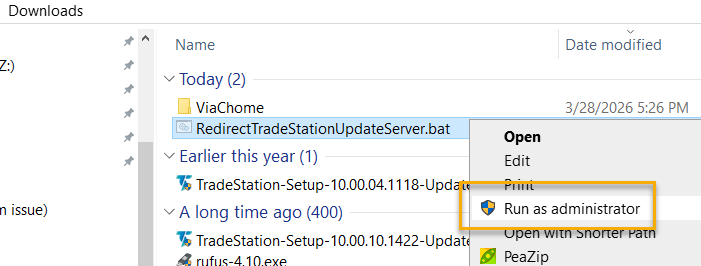
Full disclosure: this is the full contents of the batch file:
@echo 127.0.0.1 svc.update.tradestation.com >> C:\Windows\System32\drivers\etc\hosts
@ipconfig /flushdns
@echo ...................................................................................................
@echo .TradeStation requests to its update server have been redirected to a black hole. No more updates.
@echo ...................................................................................................
@pause
Rename/Remove Patch Installation Program
There are two primary program executables involved in TradeStation’s update process: PatchDownloader.exe and PatchInstaller.exe. We want to keep one (PatchDownloader.exe) and rename the other (PatchInstaller.exe).
Make these modifications to your C:\Program Files (x86)\TradeStation 10.0\Program folder (or wherever you have installed TradeStation):
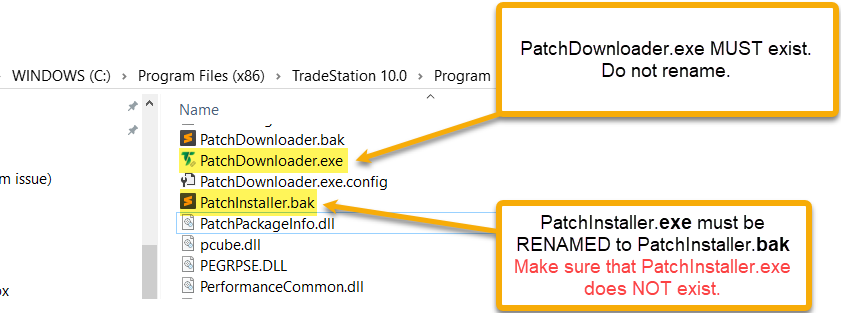
Hopefully with these two simple changes we will have better version control over TradeStation’s releases, especially when those releases break things that should never have been broken!
Resuming TradeStation Updates
If you ever wish to resume TradeStation updates, then:
-
- Remove the line “127.0.0.1 svc.update.tradestation.com” from this file: C:\Windows\System32\drivers\etc\hosts
- Rename the fie PatchInstaller.bak to PatchInstaller.exe